香港二樓書店 > 今日好書推介
|
|
|
|
- 定價227.00元
-
8
折優惠:HK$181.6

|
|
| |
|
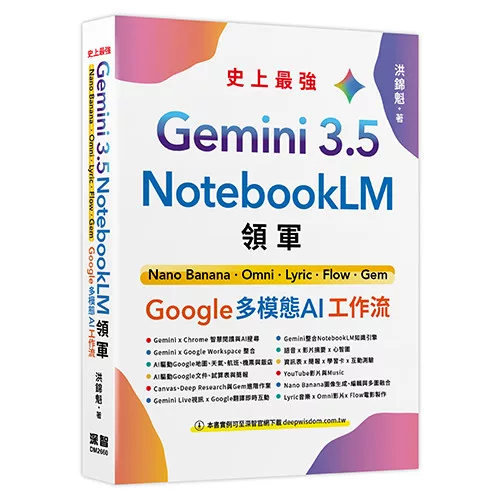
Gemini 3.5 x NotebookLM 領軍: Nano Banana x Omni x Lyric x Flow x Gem - Google 多模態 AI 工作流
|
|
沒有庫存
訂購需時10-14天
|
|
|
|
 |
|
9786267889527 |
|
|
 |
|
洪錦魁 |
|
|
 |
|
深智數位
|
|
|
 |
|
2026年7月13日 |
|
|
 |
|
230.00 元 |
|
|
 |
|
HK$ 195.5
|
|
|
|
|

|
|
|
|
|
|
|
|
詳
細
資
料 |
ISBN:9786267889527</li><li>規格:平裝 / 512頁 / 23 x 17 x 2.56 cm / 普通級 / 全彩印刷 / 初版</li><li>出版地:台灣 |
|
分
類 |
[ 尚未分類 ] |
|
目
錄 |
<div class="bd">
<div class="content more_off" id="M201105_0_getProdTextInfo_P00a400020009_h2">
<p remove="function(b){var a=this.indexOf(b);if(a!=-1){this.splice(a,1)}return this}">
<br remove="function(b){var a=this.indexOf(b);if(a!=-1){this.splice(a,1)}return this}">
<br remove="function(b){var a=this.indexOf(b);if(a!=-1){this.splice(a,1)}return this}">
<span style="color:#0000ff;"><strong>▍第1 章 認識與快速上手Gemini</strong></span><br remove="function(b){var a=this.indexOf(b);if(a!=-1){this.splice(a,1)}return this}">
1-1 Gemini 是什麼<br remove="function(b){var a=this.indexOf(b);if(a!=-1){this.splice(a,1)}return this}">
1-2 登入與認識Gemini 操作環境<br remove="function(b){var a=this.indexOf(b);if(a!=-1){this.splice(a,1)}return this}">
1-3 與Gemini 聊天 – 展現Google AI的特色<br remove="function(b){var a=this.indexOf(b);if(a!=-1){this.splice(a,1)}return this}">
1-4 生成與操作聊天主題<br remove="function(b){var a=this.indexOf(b);if(a!=-1){this.splice(a,1)}return this}">
1-5 分享聊天內容<br remove="function(b){var a=this.indexOf(b);if(a!=-1){this.splice(a,1)}return this}">
1-6 匯出到文件 – Google 文件與Gmail<br remove="function(b){var a=this.indexOf(b);if(a!=-1){this.splice(a,1)}return this}">
1-7 閱讀網址內容生成摘要報告<br remove="function(b){var a=this.indexOf(b);if(a!=-1){this.splice(a,1)}return this}">
1-8 活動紀錄<br remove="function(b){var a=this.indexOf(b);if(a!=-1){this.splice(a,1)}return this}">
1-9 搜尋對話功能<br remove="function(b){var a=this.indexOf(b);if(a!=-1){this.splice(a,1)}return this}">
1-10 將個人化記憶匯入Gemini<br remove="function(b){var a=this.indexOf(b);if(a!=-1){this.splice(a,1)}return this}">
1-11 個人智慧化服務<br remove="function(b){var a=this.indexOf(b);if(a!=-1){this.splice(a,1)}return this}">
?<br remove="function(b){var a=this.indexOf(b);if(a!=-1){this.splice(a,1)}return this}">
<span style="color:#0000ff;"><strong>▍第2 章 AI 外語隨身教練- Gemini 語音與Google 翻譯</strong></span><br remove="function(b){var a=this.indexOf(b);if(a!=-1){this.splice(a,1)}return this}">
2-1 Gemini 語音輸入邁向外語學習<br remove="function(b){var a=this.indexOf(b);if(a!=-1){this.splice(a,1)}return this}">
2-2 Google 翻譯<br remove="function(b){var a=this.indexOf(b);if(a!=-1){this.splice(a,1)}return this}">
?<br remove="function(b){var a=this.indexOf(b);if(a!=-1){this.splice(a,1)}return this}">
<span style="color:#0000ff;"><strong>▍第3 章 聊天技巧與輸出格式的規則</strong></span><br remove="function(b){var a=this.indexOf(b);if(a!=-1){this.splice(a,1)}return this}">
3-1 聊天技巧<br remove="function(b){var a=this.indexOf(b);if(a!=-1){this.splice(a,1)}return this}">
3-2 如何讓Gemini 用您指定的格式回應<br remove="function(b){var a=this.indexOf(b);if(a!=-1){this.splice(a,1)}return this}">
3-3 條列式、Q&A、表格輸出控制<br remove="function(b){var a=this.indexOf(b);if(a!=-1){this.splice(a,1)}return this}">
3-4 限制字數與加入實例<br remove="function(b){var a=this.indexOf(b);if(a!=-1){this.splice(a,1)}return this}">
?<br remove="function(b){var a=this.indexOf(b);if(a!=-1){this.splice(a,1)}return this}">
<span style="color:#0000ff;"><strong>▍第4 章 AI 圖像創作 - Nano Banana</strong></span><br remove="function(b){var a=this.indexOf(b);if(a!=-1){this.splice(a,1)}return this}">
4-1 文字生成圖像的時代來臨<br remove="function(b){var a=this.indexOf(b);if(a!=-1){this.splice(a,1)}return this}">
4-2 文字 → 圖像 - Nano Banana 2的關鍵功能<br remove="function(b){var a=this.indexOf(b);if(a!=-1){this.splice(a,1)}return this}">
4-3 實際應用 - 用文字生成真正能用的專業圖像<br remove="function(b){var a=this.indexOf(b);if(a!=-1){this.splice(a,1)}return this}">
4-4 企業導入AI 專題 - 用資訊圖快速建立共同語言<br remove="function(b){var a=this.indexOf(b);if(a!=-1){this.splice(a,1)}return this}">
4-5 學校導入 AI 教育的資訊圖<br remove="function(b){var a=this.indexOf(b);if(a!=-1){this.splice(a,1)}return this}">
4-6 繪製心智圖(AI-Generated Mind Maps)<br remove="function(b){var a=this.indexOf(b);if(a!=-1){this.splice(a,1)}return this}">
4-7 製作 AI 旅遊地圖與情境地圖<br remove="function(b){var a=this.indexOf(b);if(a!=-1){this.splice(a,1)}return this}">
4-8 從資料到圖像 - 即時資訊可視化應用<br remove="function(b){var a=this.indexOf(b);if(a!=-1){this.splice(a,1)}return this}">
4-9 漫畫與多格漫畫創作中的應用<br remove="function(b){var a=this.indexOf(b);if(a!=-1){this.splice(a,1)}return this}">
4-10 Gemini x Nano Banana 塗鴉<br remove="function(b){var a=this.indexOf(b);if(a!=-1){this.splice(a,1)}return this}">
?<br remove="function(b){var a=this.indexOf(b);if(a!=-1){this.splice(a,1)}return this}">
<span style="color:#0000ff;"><strong>▍第5 章 AI 圖像編輯 - Nano Banana</strong></span><br remove="function(b){var a=this.indexOf(b);if(a!=-1){this.splice(a,1)}return this}">
5-1 圖生圖<br remove="function(b){var a=this.indexOf(b);if(a!=-1){this.splice(a,1)}return this}">
5-2 多圖融合 - 人物移動<br remove="function(b){var a=this.indexOf(b);if(a!=-1){this.splice(a,1)}return this}">
5-3 多圖融合 - 合成新圖像<br remove="function(b){var a=this.indexOf(b);if(a!=-1){this.splice(a,1)}return this}">
5-4 世界知識加成 - 自動融入合理的背景元素<br remove="function(b){var a=this.indexOf(b);if(a!=-1){this.splice(a,1)}return this}">
5-5 官網展示實例<br remove="function(b){var a=this.indexOf(b);if(a!=-1){this.splice(a,1)}return this}">
?<br remove="function(b){var a=this.indexOf(b);if(a!=-1){this.splice(a,1)}return this}">
<span style="color:#0000ff;"><strong>▍第6 章 Gemini x Google 服務 - 把AI變成你的日常生活助理</strong></span><br remove="function(b){var a=this.indexOf(b);if(a!=-1){this.splice(a,1)}return this}">
6-1 Google 地圖 - 智慧導覽與資訊查詢<br remove="function(b){var a=this.indexOf(b);if(a!=-1){this.splice(a,1)}return this}">
6-2 Google 航班/ 機票 - 智慧查詢與比價<br remove="function(b){var a=this.indexOf(b);if(a!=-1){this.splice(a,1)}return this}">
6-3 Google 飯店 - 智慧查詢與比價<br remove="function(b){var a=this.indexOf(b);if(a!=-1){this.splice(a,1)}return this}">
6-4 結合地圖、航班或飯店的旅遊規劃<br remove="function(b){var a=this.indexOf(b);if(a!=-1){this.splice(a,1)}return this}">
6-5 YouTube 應用<br remove="function(b){var a=this.indexOf(b);if(a!=-1){this.splice(a,1)}return this}">
<span style="color:#0000ff;"><strong>?<br remove="function(b){var a=this.indexOf(b);if(a!=-1){this.splice(a,1)}return this}">
▍第7 章 Gemini 應用程式 – Google Workspace</strong></span><br remove="function(b){var a=this.indexOf(b);if(a!=-1){this.splice(a,1)}return this}">
7-1 認識「應用程式」<br remove="function(b){var a=this.indexOf(b);if(a!=-1){this.splice(a,1)}return this}">
7-2 Gmail 應用 - 智慧郵件操作<br remove="function(b){var a=this.indexOf(b);if(a!=-1){this.splice(a,1)}return this}">
7-3 Google Calendar - 時間管理<br remove="function(b){var a=this.indexOf(b);if(a!=-1){this.splice(a,1)}return this}">
7-4 Google Keep - 雲端筆記<br remove="function(b){var a=this.indexOf(b);if(a!=-1){this.splice(a,1)}return this}">
7-5 Google Tasks - 建立待辦清單系統<br remove="function(b){var a=this.indexOf(b);if(a!=-1){this.splice(a,1)}return this}">
7-6 Google 文件 – 生成與摘要<br remove="function(b){var a=this.indexOf(b);if(a!=-1){this.splice(a,1)}return this}">
7-7 Google 雲端硬碟<br remove="function(b){var a=this.indexOf(b);if(a!=-1){this.splice(a,1)}return this}">
7-8 YouTube 與 YouTube Music 應用<br remove="function(b){var a=this.indexOf(b);if(a!=-1){this.splice(a,1)}return this}">
7-9 Gemini 3.5 應用程式中的 Verify AI功能說明<br remove="function(b){var a=this.indexOf(b);if(a!=-1){this.splice(a,1)}return this}">
?<br remove="function(b){var a=this.indexOf(b);if(a!=-1){this.splice(a,1)}return this}">
<span style="color:#0000ff;"><strong>▍第8 章 Chrome x Gemini - 從 AI 搜尋到智慧瀏覽助理</strong></span><br remove="function(b){var a=this.indexOf(b);if(a!=-1){this.splice(a,1)}return this}">
8-1 AI Overview 入門 - 讓搜尋直接告訴你答案<br remove="function(b){var a=this.indexOf(b);if(a!=-1){this.splice(a,1)}return this}">
8-2 Gemini 如何驅動 Chrome 的 AI搜尋系統<br remove="function(b){var a=this.indexOf(b);if(a!=-1){this.splice(a,1)}return this}">
8-3 進入Chrome 的AI 搜尋<br remove="function(b){var a=this.indexOf(b);if(a!=-1){this.splice(a,1)}return this}">
8-4 實作AI 搜尋<br remove="function(b){var a=this.indexOf(b);if(a!=-1){this.splice(a,1)}return this}">
8-5 Chrome 的「問問Gemini」<br remove="function(b){var a=this.indexOf(b);if(a!=-1){this.splice(a,1)}return this}">
?<br remove="function(b){var a=this.indexOf(b);if(a!=-1){this.splice(a,1)}return this}">
<span style="color:#0000ff;"><strong>▍第9 章 文字、音訊與圖像檔案上傳 -智慧分析</strong></span><br remove="function(b){var a=this.indexOf(b);if(a!=-1){this.splice(a,1)}return this}">
9-1 檔案上傳與分析的核心價值<br remove="function(b){var a=this.indexOf(b);if(a!=-1){this.splice(a,1)}return this}">
9-2 文件型檔案分析(Word、PDF)<br remove="function(b){var a=this.indexOf(b);if(a!=-1){this.splice(a,1)}return this}">
9-3 音訊檔案轉文字稿<br remove="function(b){var a=this.indexOf(b);if(a!=-1){this.splice(a,1)}return this}">
9-4 影片檔案內容分析<br remove="function(b){var a=this.indexOf(b);if(a!=-1){this.splice(a,1)}return this}">
9-5 AI 視覺 - 上傳圖像,理解圖像內容<br remove="function(b){var a=this.indexOf(b);if(a!=-1){this.splice(a,1)}return this}">
?<br remove="function(b){var a=this.indexOf(b);if(a!=-1){this.splice(a,1)}return this}">
<span style="color:#0000ff;"><strong>▍第10 章 Google 文件、試算表與簡報的AI 升級</strong></span><br remove="function(b){var a=this.indexOf(b);if(a!=-1){this.splice(a,1)}return this}">
10-1 Google 文件<br remove="function(b){var a=this.indexOf(b);if(a!=-1){this.splice(a,1)}return this}">
10-2 Google 試算表<br remove="function(b){var a=this.indexOf(b);if(a!=-1){this.splice(a,1)}return this}">
10-3 Google 簡報<br remove="function(b){var a=this.indexOf(b);if(a!=-1){this.splice(a,1)}return this}">
?<br remove="function(b){var a=this.indexOf(b);if(a!=-1){this.splice(a,1)}return this}">
<span style="color:#0000ff;"><strong>▍第11 章 Gemini 的 Canvas 功能</strong></span><br remove="function(b){var a=this.indexOf(b);if(a!=-1){this.splice(a,1)}return this}">
11-1 Canvas 功能概覽<br remove="function(b){var a=this.indexOf(b);if(a!=-1){this.splice(a,1)}return this}">
11-2 建立Canvas 文案<br remove="function(b){var a=this.indexOf(b);if(a!=-1){this.splice(a,1)}return this}">
11-3 讓文件活起來 - Canvas「 建立」應用<br remove="function(b){var a=this.indexOf(b);if(a!=-1){this.splice(a,1)}return this}">
11-4 用Canvas 檢視或摘要檔案<br remove="function(b){var a=this.indexOf(b);if(a!=-1){this.splice(a,1)}return this}">
11-5 Canvas 設計帕斯卡三角形遊戲<br remove="function(b){var a=this.indexOf(b);if(a!=-1){this.splice(a,1)}return this}">
?<br remove="function(b){var a=this.indexOf(b);if(a!=-1){this.splice(a,1)}return this}">
<span style="color:#0000ff;"><strong>▍第12 章 Deep Research 深度研究</strong></span><br remove="function(b){var a=this.indexOf(b);if(a!=-1){this.splice(a,1)}return this}">
12-1 Deep Research 功能概覽<br remove="function(b){var a=this.indexOf(b);if(a!=-1){this.splice(a,1)}return this}">
12-2 操作流程<br remove="function(b){var a=this.indexOf(b);if(a!=-1){this.splice(a,1)}return this}">
12-3 實際應用情境<br remove="function(b){var a=this.indexOf(b);if(a!=-1){this.splice(a,1)}return this}">
?<br remove="function(b){var a=this.indexOf(b);if(a!=-1){this.splice(a,1)}return this}">
<span style="color:#0000ff;"><strong>▍第13 章 探索Gem - 建立專屬AI 助理</strong></span><br remove="function(b){var a=this.indexOf(b);if(a!=-1){this.splice(a,1)}return this}">
13-1 什麼是 Gem<br remove="function(b){var a=this.indexOf(b);if(a!=-1){this.splice(a,1)}return this}">
13-2 認識與建立Gem 環境<br remove="function(b){var a=this.indexOf(b);if(a!=-1){this.splice(a,1)}return this}">
13-3 Gem 管理工具<br remove="function(b){var a=this.indexOf(b);if(a!=-1){this.splice(a,1)}return this}">
13-4 英文學習卡 Gem<br remove="function(b){var a=this.indexOf(b);if(a!=-1){this.splice(a,1)}return this}">
13-5 電商客服 Gem<br remove="function(b){var a=this.indexOf(b);if(a!=-1){this.splice(a,1)}return this}">
13-6 我可以稱Gem 是打造「專屬AI Agent 嗎」<br remove="function(b){var a=this.indexOf(b);if(a!=-1){this.splice(a,1)}return this}">
?<br remove="function(b){var a=this.indexOf(b);if(a!=-1){this.splice(a,1)}return this}">
<span style="color:#0000ff;"><strong>▍第14 章 創作音樂與 Lyria 3</strong></span><br remove="function(b){var a=this.indexOf(b);if(a!=-1){this.splice(a,1)}return this}">
14-1 Lyria 3 模型技術架構與生成機制<br remove="function(b){var a=this.indexOf(b);if(a!=-1){this.splice(a,1)}return this}">
14-2 Gemini 創作音樂環境<br remove="function(b){var a=this.indexOf(b);if(a!=-1){this.splice(a,1)}return this}">
14-3 實際操作流程完整示範<br remove="function(b){var a=this.indexOf(b);if(a!=-1){this.splice(a,1)}return this}">
14-4 創作英文歌曲<br remove="function(b){var a=this.indexOf(b);if(a!=-1){this.splice(a,1)}return this}">
?<br remove="function(b){var a=this.indexOf(b);if(a!=-1){this.splice(a,1)}return this}">
<span style="color:#0000ff;"><strong>▍第15 章 AI 語音影片生成新紀元 -Gemini Omni x Flow</strong></span><br remove="function(b){var a=this.indexOf(b);if(a!=-1){this.splice(a,1)}return this}">
15-1 Gemini Omni 的定位與特點<br remove="function(b){var a=this.indexOf(b);if(a!=-1){this.splice(a,1)}return this}">
15-2 Gemini Omni 的操作流程<br remove="function(b){var a=this.indexOf(b);if(a!=-1){this.splice(a,1)}return this}">
15-3 文字生成影片<br remove="function(b){var a=this.indexOf(b);if(a!=-1){this.splice(a,1)}return this}">
15-4 圖片生成影片<br remove="function(b){var a=this.indexOf(b);if(a!=-1){this.splice(a,1)}return this}">
15-5 文字 + 圖片 - 飛翔的英雄<br remove="function(b){var a=this.indexOf(b);if(a!=-1){this.splice(a,1)}return this}">
15-6 建立含語音的影片 - 電光英雄<br remove="function(b){var a=this.indexOf(b);if(a!=-1){this.splice(a,1)}return this}">
15-7 影片再創作:從上傳影片到 AI導演<br remove="function(b){var a=this.indexOf(b);if(a!=-1){this.splice(a,1)}return this}">
15-8 實驗性創作工具Google Flow -從生成片段走向完整影片製作<br remove="function(b){var a=this.indexOf(b);if(a!=-1){this.splice(a,1)}return this}">
?<br remove="function(b){var a=this.indexOf(b);if(a!=-1){this.splice(a,1)}return this}">
<span style="color:#0000ff;"><strong>▍第16 章 Gemini App 與Live - 手機上的隨身 AI 助手</strong></span><br remove="function(b){var a=this.indexOf(b);if(a!=-1){this.splice(a,1)}return this}">
16-1 安裝與登入<br remove="function(b){var a=this.indexOf(b);if(a!=-1){this.splice(a,1)}return this}">
16-2 操作介面導覽<br remove="function(b){var a=this.indexOf(b);if(a!=-1){this.splice(a,1)}return this}">
16-3 Gemini App 行動體驗特色<br remove="function(b){var a=this.indexOf(b);if(a!=-1){this.splice(a,1)}return this}">
16-4 Gemini Live<br remove="function(b){var a=this.indexOf(b);if(a!=-1){this.splice(a,1)}return this}">
?<br remove="function(b){var a=this.indexOf(b);if(a!=-1){this.splice(a,1)}return this}">
<span style="color:#0000ff;"><strong>▍第17 章 NotebookLM - AI 智慧筆記與研究助理</strong></span><br remove="function(b){var a=this.indexOf(b);if(a!=-1){this.splice(a,1)}return this}">
17-1 NotebookLM 的定位與演變<br remove="function(b){var a=this.indexOf(b);if(a!=-1){this.splice(a,1)}return this}">
17-2 NotebookLM 視窗與筆記操作環境<br remove="function(b){var a=this.indexOf(b);if(a!=-1){this.splice(a,1)}return this}">
17-3 建立NotebookLM 的知識引擎<br remove="function(b){var a=this.indexOf(b);if(a!=-1){this.splice(a,1)}return this}">
17-4 智慧「對話」 - 與 NotebookLM的互動中樞<br remove="function(b){var a=this.indexOf(b);if(a!=-1){this.splice(a,1)}return this}">
17-5 工作室 - 多模態輸出的創作空間<br remove="function(b){var a=this.indexOf(b);if(a!=-1){this.splice(a,1)}return this}">
17-6 我的筆記本<br remove="function(b){var a=this.indexOf(b);if(a!=-1){this.splice(a,1)}return this}">
?<br remove="function(b){var a=this.indexOf(b);if(a!=-1){this.splice(a,1)}return this}">
<span style="color:#0000ff;"><strong>▍第18 章 Gemini 內建筆記本 -NotebookLM 進入Gemini工作流程</strong></span><br remove="function(b){var a=this.indexOf(b);if(a!=-1){this.splice(a,1)}return this}">
18-1 Gemini 為什麼內建筆記本<br remove="function(b){var a=this.indexOf(b);if(a!=-1){this.splice(a,1)}return this}">
18-2 Gemini 筆記本與 NotebookLM的關係<br remove="function(b){var a=this.indexOf(b);if(a!=-1){this.splice(a,1)}return this}">
18-3 在 Gemini 中建立筆記本<br remove="function(b){var a=this.indexOf(b);if(a!=-1){this.splice(a,1)}return this}">
18-4 Gemini 筆記本適合哪些使用情境<br remove="function(b){var a=this.indexOf(b);if(a!=-1){this.splice(a,1)}return this}">
18-5 在 Gemini 中使用 NotebookLM建立的筆記本<br remove="function(b){var a=this.indexOf(b);if(a!=-1){this.splice(a,1)}return this}">
18-6 未來 AI 知識工作流程的改變<br remove="function(b){var a=this.indexOf(b);if(a!=-1){this.splice(a,1)}return this}">
?<br remove="function(b){var a=this.indexOf(b);if(a!=-1){this.splice(a,1)}return this}">
<span style="color:#0000ff;"><strong>▍附錄A AI 導師上線- 體驗Gemini 的引導式學習( 深智官網下載電子書)</strong></span><br remove="function(b){var a=this.indexOf(b);if(a!=-1){this.splice(a,1)}return this}">
?</p>
</div> |
|
| 序 |
<div class="bd">
<div class="content more_off" id="M201105_0_getProdTextInfo_P00a400020009_h3">
<p remove="function(b){var a=this.indexOf(b);if(a!=-1){this.splice(a,1)}return this}">
<br remove="function(b){var a=this.indexOf(b);if(a!=-1){this.splice(a,1)}return this}">
<br remove="function(b){var a=this.indexOf(b);if(a!=-1){this.splice(a,1)}return this}">
<span style="color:#0000ff;"><strong>序</strong></span><br remove="function(b){var a=this.indexOf(b);if(a!=-1){this.splice(a,1)}return this}">
?<br remove="function(b){var a=this.indexOf(b);if(a!=-1){this.splice(a,1)}return this}">
人工智慧的發展,正從「會回答問題的對話系統」,正式邁入「能參與工作流程、協助創作、整理知識與串連工具的智慧協作夥伴」階段。Gemini 3.5 的出現,不只是模型能力的升級,更象徵 Google AI 生態系完成一次重要的整合與轉向。AI 不再只是單一工具,而是逐漸成為貫穿學習、工作、研究、生活與創作流程的核心引擎。<br remove="function(b){var a=this.indexOf(b);if(a!=-1){this.splice(a,1)}return this}">
?<br remove="function(b){var a=this.indexOf(b);if(a!=-1){this.splice(a,1)}return this}">
在 Gemini 3.5 的架構下,文字、語音、圖像、音樂、影片、文件與資料不再各自分散,而是能在同一個對話、專案與知識脈絡中彼此轉換、補強與延伸。透過 Chrome x Gemini 的智慧搜尋與瀏覽輔助、Nano Banana 的圖像生成與編輯、Lyria 3 的音樂創作、Gemini Omni x Flow 的影音生成能力,以及 NotebookLM 所建構的智慧筆記與研究助理,Google 已逐步形塑出一套真正可落地的「多模態 AI 工作流」。<br remove="function(b){var a=this.indexOf(b);if(a!=-1){this.splice(a,1)}return this}">
?<br remove="function(b){var a=this.indexOf(b);if(a!=-1){this.splice(a,1)}return this}">
本書即是在這樣的背景下誕生,並以「Gemini 3.5 x NotebookLM 領軍,邁向Google 多模態 AI 工作流」為核心主軸,系統性整理 Gemini 3.5 世代的完整能力版圖。內容涵蓋從 Gemini 快速上手、聊天技巧、輸出格式控制,到 Chrome AI 搜尋、Google Workspace 深度整合;從檔案上傳分析、Canvas 視覺化工作空間、Deep Research 深度研究,到 Gem 專屬 AI 助理的建立;並進一步深入圖像、音樂、語音、影片與知識管理等跨模態應用,完整呈現 AI 如何從「輔助思考」進化為「共同創作」。<br remove="function(b){var a=this.indexOf(b);if(a!=-1){this.splice(a,1)}return this}">
?<br remove="function(b){var a=this.indexOf(b);if(a!=-1){this.splice(a,1)}return this}">
在本書中,讀者將實際體驗:<br remove="function(b){var a=this.indexOf(b);if(a!=-1){this.splice(a,1)}return this}">
z Gemini 3.5 如何改變搜尋、寫作、規劃、學習與決策的工作模式。<br remove="function(b){var a=this.indexOf(b);if(a!=-1){this.splice(a,1)}return this}">
z Chrome x Gemini 如何讓瀏覽器從查資料工具,升級為智慧閱讀與搜尋助理。<br remove="function(b){var a=this.indexOf(b);if(a!=-1){this.splice(a,1)}return this}">
z Nano Banana 如何讓文字生成圖像,並進一步完成圖像編輯、合成與視覺化應用。<br remove="function(b){var a=this.indexOf(b);if(a!=-1){this.splice(a,1)}return this}">
z Lyria 3、Gemini Omni 與 Flow 如何開啟音樂、語音與影片生成的新型創作流程。<br remove="function(b){var a=this.indexOf(b);if(a!=-1){this.splice(a,1)}return this}">
z Canvas、Deep Research 與 Gem 如何協助使用者整理內容、研究議題並建立專屬 AI 助理。<br remove="function(b){var a=this.indexOf(b);if(a!=-1){this.splice(a,1)}return this}">
z NotebookLM 如何將來源資料轉化為摘要、問答、筆記、學習卡、測驗、簡報與語音摘要等知識成果。<br remove="function(b){var a=this.indexOf(b);if(a!=-1){this.splice(a,1)}return this}">
z Gemini App 與 Gemini Live 如何把多模態 AI 帶入手機、語音互動與即時生活場景。<br remove="function(b){var a=this.indexOf(b);if(a!=-1){this.splice(a,1)}return this}">
?<br remove="function(b){var a=this.indexOf(b);if(a!=-1){this.splice(a,1)}return this}">
本書並非單純介紹功能,而是試圖回答一個更關鍵的問題:在 AI 已經能理解內容、生成素材、分析資料、輔助推理與組織知識的時代,人應該如何與 AI 協作,才能真正放大自己的能力,而不是被工具牽著走?<br remove="function(b){var a=this.indexOf(b);if(a!=-1){this.splice(a,1)}return this}">
?<br remove="function(b){var a=this.indexOf(b);if(a!=-1){this.splice(a,1)}return this}">
AI 的價值,從來不只是展示它能完成多少任務,而在於它是否能幫助我們想得更清楚、學得更有效率、整理得更有系統、創作得更有方向。這也是本書一以貫之的核心精神:將 Gemini 3.5 與 Google AI 生態系,轉化為日常可實踐、可累積、可進化的智慧工作方法。<br remove="function(b){var a=this.indexOf(b);if(a!=-1){this.splice(a,1)}return this}">
?<br remove="function(b){var a=this.indexOf(b);if(a!=-1){this.splice(a,1)}return this}">
期盼讀者在閱讀本書後,不僅能熟練操作 Gemini 3.5、NotebookLM、Chrome、Nano Banana、Omni、Flow 與 Gem 等工具,更能建立屬於自己的多模態 AI 工作流思維,並將其實際應用於學習、研究、職場、行銷、教學與創意創作之中。當 AI 成為思考與創作的長期夥伴,未來不再只是即將到來,而是正在我們每一次對話、每一份文件、每一個筆記本與每一個專案中,逐步成形。<br remove="function(b){var a=this.indexOf(b);if(a!=-1){this.splice(a,1)}return this}">
?<br remove="function(b){var a=this.indexOf(b);if(a!=-1){this.splice(a,1)}return this}">
本書編寫雖力求完善,然疏漏與不足仍在所難免,尚祈讀者不吝指正、賜教,讓這本《Gemini 3.5 x NotebookLM 領軍:Nano Banana x Omni x Lyric x Flow x Gem -Google 多模態 AI 工作流》能持續修正、持續進化,陪伴讀者一同前行。<br remove="function(b){var a=this.indexOf(b);if(a!=-1){this.splice(a,1)}return this}">
?<br remove="function(b){var a=this.indexOf(b);if(a!=-1){this.splice(a,1)}return this}">
<br>
<br>
?</p>
<p remove="function(b){var a=this.indexOf(b);if(a!=-1){this.splice(a,1)}return this}" style="text-align: right;">
洪錦魁2026/7/10<br remove="function(b){var a=this.indexOf(b);if(a!=-1){this.splice(a,1)}return this}">
編號:320/370/500<br remove="function(b){var a=this.indexOf(b);if(a!=-1){this.splice(a,1)}return this}">
<a href="/cdn-cgi/l/email-protection" class="__cf_email__" data-cfemail="305a59595e5b475559705d551e535f5d">[email protected]</a></p>
<p remove="function(b){var a=this.indexOf(b);if(a!=-1){this.splice(a,1)}return this}">
<br remove="function(b){var a=this.indexOf(b);if(a!=-1){this.splice(a,1)}return this}">
<br remove="function(b){var a=this.indexOf(b);if(a!=-1){this.splice(a,1)}return this}">
?<br remove="function(b){var a=this.indexOf(b);if(a!=-1){this.splice(a,1)}return this}">
<strong>臉書粉絲團</strong><br remove="function(b){var a=this.indexOf(b);if(a!=-1){this.splice(a,1)}return this}">
歡迎加入:王者歸來電腦專業圖書系列<br remove="function(b){var a=this.indexOf(b);if(a!=-1){this.splice(a,1)}return this}">
歡迎加入:iCoding 程式語言讀書會<br remove="function(b){var a=this.indexOf(b);if(a!=-1){this.splice(a,1)}return this}">
歡迎加入:MQTT 與AIoT 整合運用<br remove="function(b){var a=this.indexOf(b);if(a!=-1){this.splice(a,1)}return this}">
歡迎加入:深度機器學習線上讀書會<br remove="function(b){var a=this.indexOf(b);if(a!=-1){this.splice(a,1)}return this}">
?<br remove="function(b){var a=this.indexOf(b);if(a!=-1){this.splice(a,1)}return this}">
<strong>圖書資源說明</strong><br remove="function(b){var a=this.indexOf(b);if(a!=-1){this.splice(a,1)}return this}">
本書籍的所有Prompt 和資源實例可以在深智公司網站下載。<br remove="function(b){var a=this.indexOf(b);if(a!=-1){this.splice(a,1)}return this}">
<br remove="function(b){var a=this.indexOf(b);if(a!=-1){this.splice(a,1)}return this}">
?</p>
</div> |
|
|
書
評 |
|
|
|
|